Free fax cover sheet
A fax cover sheet is the first page of a fax: it says who the fax is for, who sent it, how many pages there are and what it is about. Fill in the form and download it as a PDF for free, or switch on the cover page when you send a fax with FaxJet.
How to use it
- 01
Fill in the fields
To, From, Subject and a short message. Add phone or fax numbers to To and From if the recipient needs them.
- 02
Download the PDF
A clean US Letter page, ready to print or to put first in your fax.
- 03
Or let FaxJet add it
Sending with FaxJet? Switch on Add a cover page and it is made for you.
At a glance
- Price
- Free
- Format
- PDF, US Letter
- Languages
- 9
- Sign up
- Not needed
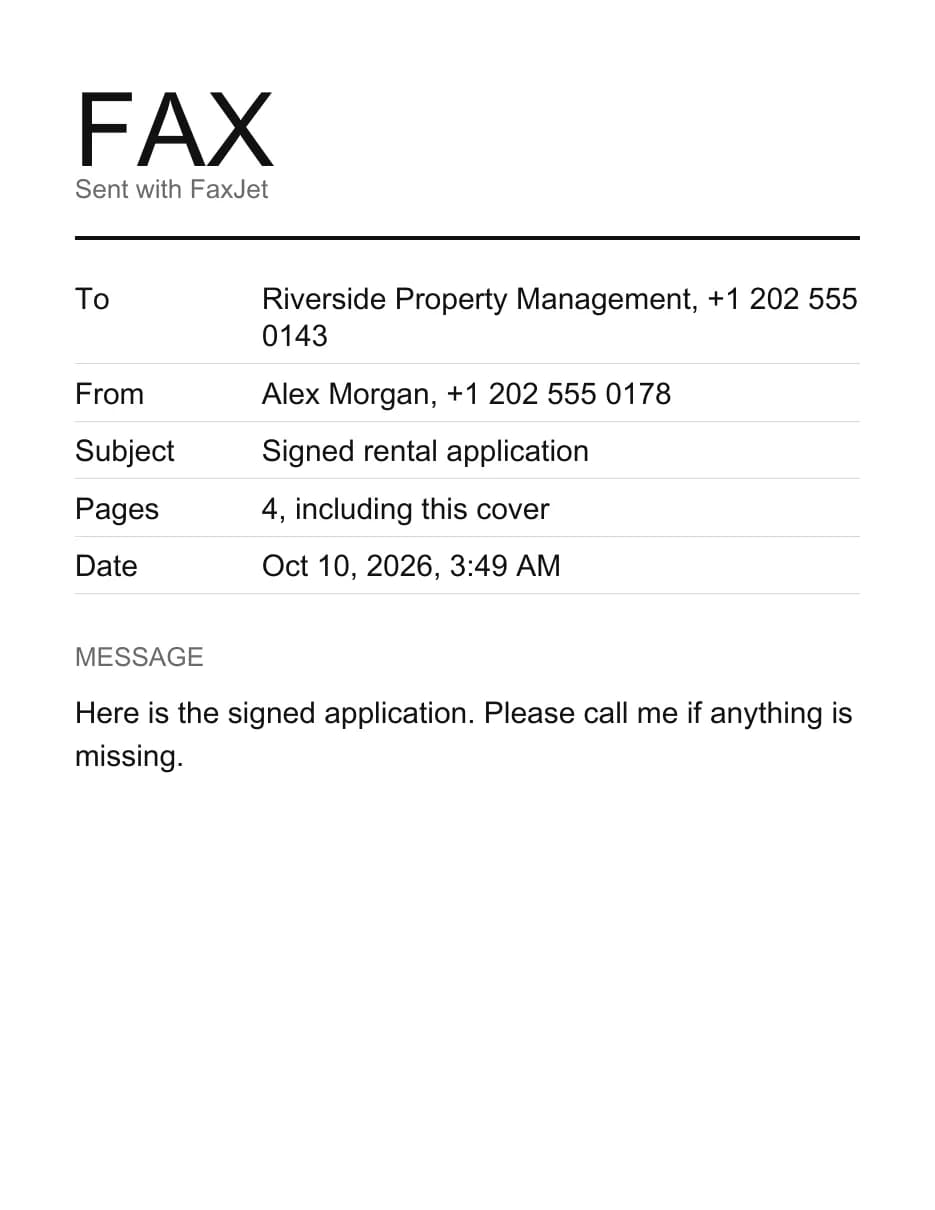
A sample cover sheet
What to put on a fax cover sheet
A good cover sheet answers four questions at a glance: who the fax is for, who sent it, how many pages to expect and what it is about.
| Field | What to write | Example |
|---|---|---|
| To | The person and the office, and their fax number | Dr. Lee, Records Department |
| From | Your name and a number for a reply | Alex Morgan, (202) 555 0178 |
| Subject | What the fax is about, with a reference if you have one | Claim 48213, signed form |
| Pages | The total, cover page included | 4, including this cover |
| Date | Filled in for you | The day you make the sheet |
| Message | One or two short sentences | Please call me if a page is missing. |
Leave out anything private. The cover page is the one page everyone near a shared fax machine can read; the details belong on the pages behind it.
Cover sheet etiquette
Offices that receive many faxes sort them by the cover page. These habits help yours reach the right desk:
- Keep it to one plain page: dark backgrounds and large logos print as black blocks and slow the fax down.
- Name a person or a department, not only the company.
- Count the pages after you add the cover page, so the recipient can tell if one is missing.
- Give a phone number for questions. A fax sent with FaxJet comes from FaxJet’s line, so the recipient can only reach you through what you write.
- Use the recipient’s language when you can: the sheet’s labels come in nine languages.
When offices expect a cover sheet
Medical practices, pharmacies, insurers, law firms, banks, schools and government offices receive many faxes on one machine. A cover sheet tells them where yours goes, and many ask for one in their instructions.
Faxes with health or financial information usually carry a confidentiality notice on the cover. A notice doesn’t make a fax secure or compliant by itself: the rules depend on who sends and who receives. FaxJet doesn’t sign business associate agreements, so check with the recipient before you fax records that require one.
A confidentiality notice you can use
Paste this into the message field, or adapt it:
“This fax is meant only for the person or office named above and may contain private information. If you received it by mistake, please tell the sender at the number above and destroy the pages.”
Cover sheet or cover letter
A cover sheet is a short form: it routes the fax and lists the pages. A cover letter is a full letter that explains what you are sending and why, such as a note to an insurer about a claim.
Most faxes need only the sheet. When you have more to say than two sentences, send the cover sheet first and put your letter right behind it, as the first page of the document.
Using the sheet with a fax machine
The PDF works on any fax machine too. Print it on plain white paper and put it on top of your pages. Count every sheet, cover included, before you write the page count.
Faxing the same document to several offices? Make one cover sheet for each recipient, since the To line changes, and keep a copy of each one with its fax receipt.
Add the cover page when you send
Sending with FaxJet? Switch on Add a cover page and fill in the same fields: FaxJet puts the sheet in front of your document and counts it as a page. It is written in the language of the page you send from. See how to send a fax from a computer or from an iPhone.
Questions
What goes on a fax cover sheet?
The recipient, the sender, the date, the number of pages and a subject. A short message is optional.
Do I need a cover sheet?
Not always, but offices that receive many faxes (doctors, insurers, government) often ask for one so the fax reaches the right person.
Does the cover sheet count as a page?
Yes. It is sent like any other page, so include it in the page count.
Is this cover sheet really free?
Yes. No sign up and no email address, and what you type isn’t stored.
Can I edit the PDF after I download it?
It is a normal PDF: print it and write on it, or make a new one here in a few seconds.
Which paper size is it?
US Letter. It also prints on A4 if you choose Fit to page in the print dialog.
Should a cover sheet have a confidentiality notice?
For medical, legal and financial faxes it is common. Use the sample on this page in the message field.